

Security Model
Lite Claw is built on the principle that personal AI agents shouldn’t require trusting the internet with your credentials and access.How Lite Claw Protects You
Zero Attack Surface
No listening ports. Outbound connections only. Nothing to find on Shodan.
Telegram Authentication
Telegram handles identity. You add a whitelist. Unauthorized users are silently ignored.
Confirmation Gates
Write operations show exactly what will happen and require a random code to confirm.
Scoped Integrations
Purpose-built tools only. No shell access. No arbitrary web browsing.
Architecture
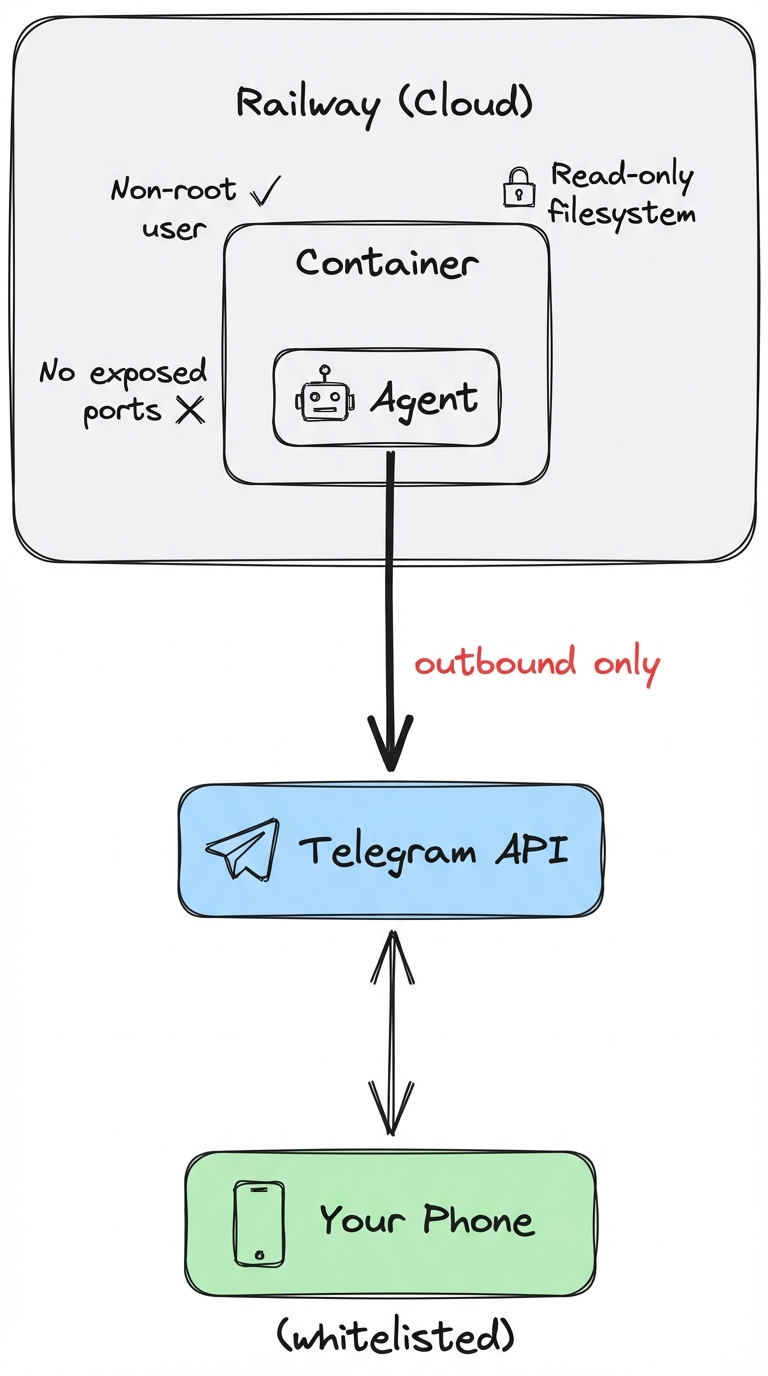
Defense Layers
1. No Exposed Ports
Lite Claw uses Telegram’s long polling — it connects outbound to Telegram’s servers and waits for messages. There’s no listening port, no webhook endpoint, nothing for attackers to probe. What this means:- Nothing to find on Shodan
- No direct attack surface
- All requests go through Telegram’s infrastructure
2. Authentication via Telegram + Whitelist
Telegram handles user authentication. We add:- Whitelist: Only approved Telegram user IDs can interact
- Owner claim: First owner must use a secret claim code
- Silent ignore: Unauthorized users get no response (no information leakage)
3. Tiered Permissions
Not all actions are equal. We use a tier system:4. Confirmation Gates
Write operations require explicit user confirmation with a random code:The random code prevents prompt injection attacks from auto-confirming actions. An attacker can trick the agent into proposing an action, but can’t trick you into confirming it.
5. Scoped Integrations
Instead of full browser/shell access, we use purpose-built integrations:- Google Calendar (read/write with confirmation)
- Gmail (read-only)
- Weather (read-only)
- No arbitrary web browsing
- No shell access
- No file system access
6. Token Encryption
All OAuth tokens are encrypted at rest using AES-256-GCM with a 32-byte key. The key is stored in environment variables, never in the database.Webhook Security
This section only applies if you deploy to Vercel, Lambda, or Modal (webhook mode). Railway uses long polling and has no exposed endpoints.
Secret Token Verification
Telegram sends a secret header with each webhook request:Unguessable Webhook Path
Place the handler behind an unguessable path:Owner Claim Protection
Even with header verification, anyone can find your bot and send/start. Protect with:
OWNER_CLAIM_CODE: First user must send/claim <code>to become ownerOWNER_TELEGRAM_ID: Explicitly set the owner ID, skip claim flow