> ## Documentation Index
> Fetch the complete documentation index at: https://docs.liteclaw.ai/llms.txt
> Use this file to discover all available pages before exploring further.
# Security
> Security architecture and threat model.
# Security Model
Lite Claw is built on the principle that personal AI agents shouldn't require trusting the internet with your credentials and access.
## How Lite Claw Protects You
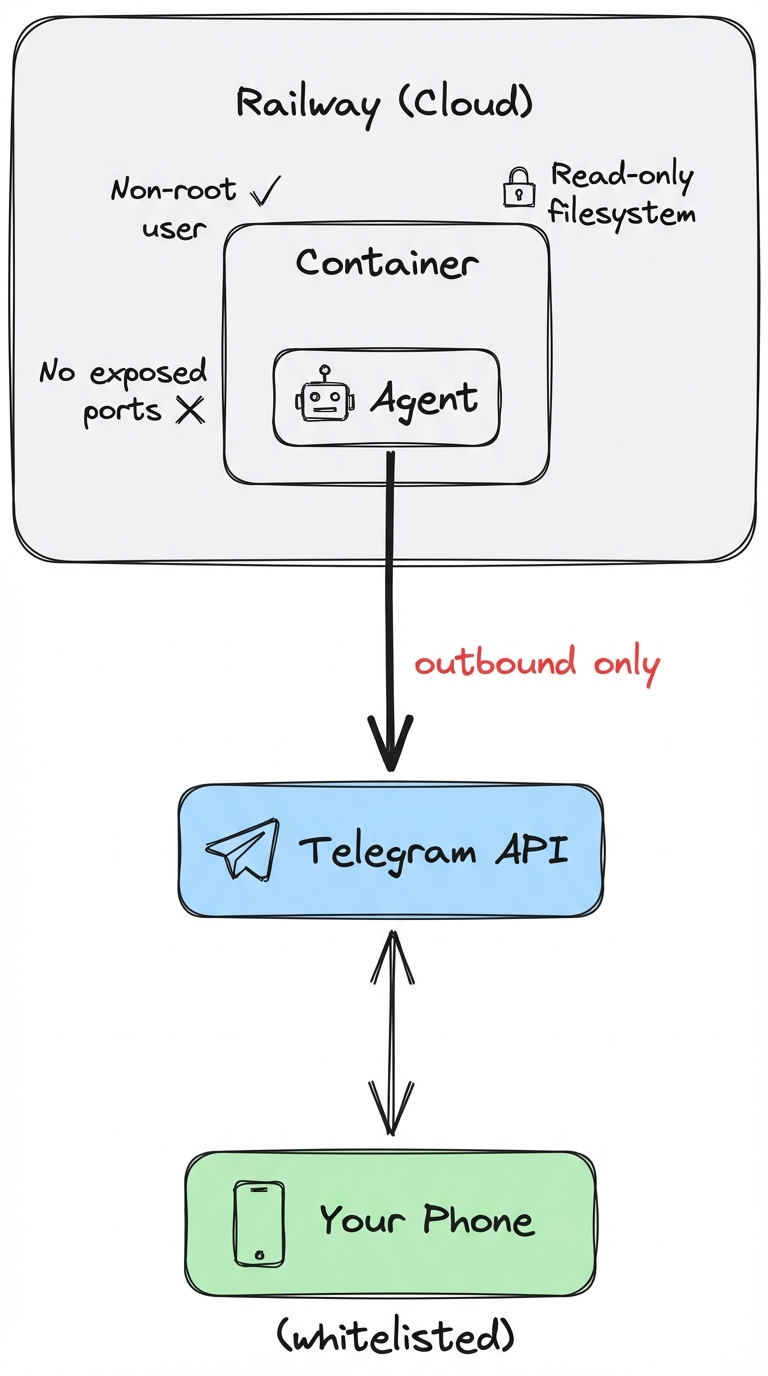
No listening ports. Outbound connections only. Nothing to find on Shodan.
Telegram handles identity. You add a whitelist. Unauthorized users are silently ignored.
Write operations show exactly what will happen and require a random code to confirm.
Purpose-built tools only. No shell access. No arbitrary web browsing.
## Architecture
 ## Defense Layers
### 1. No Exposed Ports
Lite Claw uses Telegram's long polling — it connects *outbound* to Telegram's servers and waits for messages. There's no listening port, no webhook endpoint, nothing for attackers to probe.
**What this means:**
* Nothing to find on Shodan
* No direct attack surface
* All requests go through Telegram's infrastructure
### 2. Authentication via Telegram + Whitelist
Telegram handles user authentication. We add:
* **Whitelist:** Only approved Telegram user IDs can interact
* **Owner claim:** First owner must use a secret claim code
* **Silent ignore:** Unauthorized users get no response (no information leakage)
### 3. Tiered Permissions
Not all actions are equal. We use a tier system:
| Tier | Sensitivity | Confirmation | Examples |
| ---- | -------------------- | ------------ | ------------------------- |
| 0 | Read-only, public | Never | weather |
| 1 | Read-only, personal | Never | calendar read, gmail read |
| 2 | Write, non-sensitive | Always | create calendar event |
| 3 | Financial/sensitive | Always | bank statements |
### 4. Confirmation Gates
Write operations require explicit user confirmation with a random code:
```
Agent: I'll create this event:
Title: Dentist appointment
When: Friday, Feb 14, 2:00pm
Calendar: Personal (Google)
Reply YES 482193 to confirm.
You: YES 482193
Agent: Done! Added to your calendar.
```
The random code prevents prompt injection attacks from auto-confirming actions. An attacker can trick the agent into *proposing* an action, but can't trick *you* into confirming it.
### 5. Scoped Integrations
Instead of full browser/shell access, we use purpose-built integrations:
* Google Calendar (read/write with confirmation)
* Gmail (read-only)
* Weather (read-only)
* **No** arbitrary web browsing
* **No** shell access
* **No** file system access
### 6. Token Encryption
All OAuth tokens are encrypted at rest using AES-256-GCM with a 32-byte key. The key is stored in environment variables, never in the database.
***
## Webhook Security
This section only applies if you deploy to Vercel, Lambda, or Modal (webhook mode). Railway uses long polling and has no exposed endpoints.
If using webhook mode, additional protections are required:
### Secret Token Verification
Telegram sends a secret header with each webhook request:
```
X-Telegram-Bot-Api-Secret-Token:
```
Your server must reject any request without an exact match.
### Unguessable Webhook Path
Place the handler behind an unguessable path:
```
/api/telegram/
```
This reduces scanning traffic but does not replace header verification.
### Owner Claim Protection
Even with header verification, anyone can find your bot and send `/start`. Protect with:
* **`OWNER_CLAIM_CODE`:** First user must send `/claim
## Defense Layers
### 1. No Exposed Ports
Lite Claw uses Telegram's long polling — it connects *outbound* to Telegram's servers and waits for messages. There's no listening port, no webhook endpoint, nothing for attackers to probe.
**What this means:**
* Nothing to find on Shodan
* No direct attack surface
* All requests go through Telegram's infrastructure
### 2. Authentication via Telegram + Whitelist
Telegram handles user authentication. We add:
* **Whitelist:** Only approved Telegram user IDs can interact
* **Owner claim:** First owner must use a secret claim code
* **Silent ignore:** Unauthorized users get no response (no information leakage)
### 3. Tiered Permissions
Not all actions are equal. We use a tier system:
| Tier | Sensitivity | Confirmation | Examples |
| ---- | -------------------- | ------------ | ------------------------- |
| 0 | Read-only, public | Never | weather |
| 1 | Read-only, personal | Never | calendar read, gmail read |
| 2 | Write, non-sensitive | Always | create calendar event |
| 3 | Financial/sensitive | Always | bank statements |
### 4. Confirmation Gates
Write operations require explicit user confirmation with a random code:
```
Agent: I'll create this event:
Title: Dentist appointment
When: Friday, Feb 14, 2:00pm
Calendar: Personal (Google)
Reply YES 482193 to confirm.
You: YES 482193
Agent: Done! Added to your calendar.
```
The random code prevents prompt injection attacks from auto-confirming actions. An attacker can trick the agent into *proposing* an action, but can't trick *you* into confirming it.
### 5. Scoped Integrations
Instead of full browser/shell access, we use purpose-built integrations:
* Google Calendar (read/write with confirmation)
* Gmail (read-only)
* Weather (read-only)
* **No** arbitrary web browsing
* **No** shell access
* **No** file system access
### 6. Token Encryption
All OAuth tokens are encrypted at rest using AES-256-GCM with a 32-byte key. The key is stored in environment variables, never in the database.
***
## Webhook Security
This section only applies if you deploy to Vercel, Lambda, or Modal (webhook mode). Railway uses long polling and has no exposed endpoints.
If using webhook mode, additional protections are required:
### Secret Token Verification
Telegram sends a secret header with each webhook request:
```
X-Telegram-Bot-Api-Secret-Token:
```
Your server must reject any request without an exact match.
### Unguessable Webhook Path
Place the handler behind an unguessable path:
```
/api/telegram/
```
This reduces scanning traffic but does not replace header verification.
### Owner Claim Protection
Even with header verification, anyone can find your bot and send `/start`. Protect with:
* **`OWNER_CLAIM_CODE`:** First user must send `/claim ` to become owner
* **`OWNER_TELEGRAM_ID`:** Explicitly set the owner ID, skip claim flow
***
## Prompt Injection Defenses
Prompt injection cannot be fully eliminated, but we reduce risk through layered defenses:
| Layer | How it helps |
| ----------------------- | ------------------------------------------ |
| No general web access | Can't load arbitrary pages with injections |
| Scoped tools | Injection limited to allowed tools |
| Confirmation prompts | Human approves sensitive actions |
| Code-based confirmation | Random codes prevent auto-confirm attacks |
***
## Sensitive Data Handling
| Risk | Mitigation |
| ------------------------- | --------------------------------------------- |
| Data sent to LLM provider | Accept or use zero-retention providers |
| Data accumulation | Auto-delete after N days |
| Log exposure | Scrub logs, short retention |
| Token storage | Encrypted at rest with `TOKEN_ENCRYPTION_KEY` |
***
## Why Not OpenClaw?
OpenClaw and similar agents expose significant attack surface by default:
| Concern | OpenClaw | Lite Claw |
| ---------------------- | --------------- | ------------------------------- |
| Exposed ports | 18789, 18791 | None |
| Authentication | Optional | Required (Telegram + whitelist) |
| Credential storage | Plaintext files | Encrypted + secret manager |
| Shell access | Full | None |
| Browser access | Full | None |
| Write confirmation | None | Required with random code |
| First-owner protection | None | Claim code required |
In February 2026, Gartner warned that OpenClaw's default configuration poses "unacceptable cybersecurity risk" due to plaintext credential storage and lack of authentication.